Error when using PC Traveller map
Submitted: Sunday, Nov 09, 2025 at 07:18
ThreadID: 151822
Views:711
Replies:2
FollowUps:7
Member - Mark B68
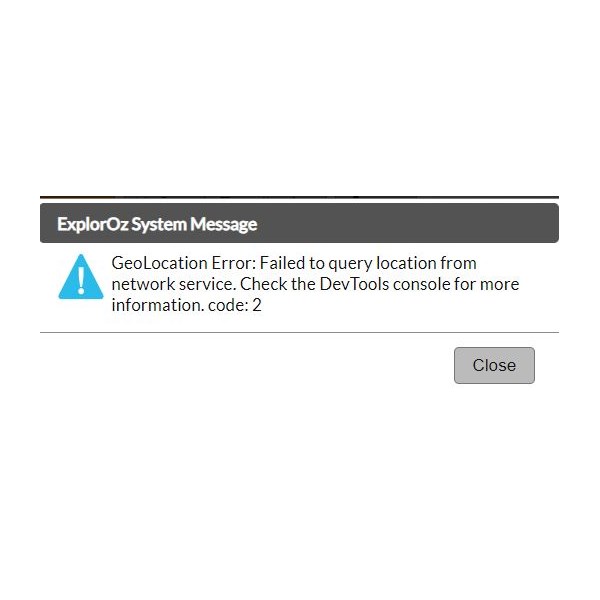
Error when using PC
Getting error message below when using the Traveller map on PC.
Assuming because no location service avail.
Fix/Workaround ??
| Mature Couple - Still working!! waiting to make the BIG STEP to go travel this big country of ours.
Background of Military Service, Medical and ITMember
My Profile My Position Send Message |
Reply By: Nomadic Navara - Sunday, Nov 09, 2025 at 07:34
Sunday, Nov 09, 2025 at 07:34
What did the Help Desk have to say about the situation?
If you don't know about them, you will find the link to the Help Desk in the bottom LH corner of this page.
AnswerID:
648665
Follow Up By: Member - Mark B68 - Sunday, Nov 09, 2025 at 09:06
Sunday, Nov 09, 2025 at 09:06
Pretty sure I am on the mark when I said NO GPS LOCATION device avail on my PC but......
| Mature Couple - Still working!! waiting to make the BIG STEP to go travel this big country of ours.
Background of Military Service, Medical and ITMember
My Profile My Position Send Message |
FollowupID:
930132
Follow Up By: Member - nick boab - Sunday, Nov 09, 2025 at 17:00
Sunday, Nov 09, 2025 at 17:00
Mark: I don't get any such message when I use PC with the app, so that's unlikely?
But you need to tell the circumstance of when you get message. IMO
FollowupID:
930133
Follow Up By: Member - Mark B68 - Sunday, Nov 09, 2025 at 17:10
Sunday, Nov 09, 2025 at 17:10
So your PC has a GPS built in to locate your home/current position ??
This is working with the Exploreoz.com traveller 9.6.2 (WEB)
If you try and update your position it will come up with an error.
Top left, Menu, Your Position, will come up with a GPS Timeout.
I dont think this can be fixed.
| Mature Couple - Still working!! waiting to make the BIG STEP to go travel this big country of ours.
Background of Military Service, Medical and ITMember
My Profile My Position Send Message |
FollowupID:
930134
Follow Up By: Member - nick boab - Sunday, Nov 09, 2025 at 17:18
Sunday, Nov 09, 2025 at 17:18
NO.. I think i mis understood you .
Edit you didn't mention GPS in you post .
Edit.
But this is why i think you need to outline . what & how , you are trying to achieve.. i.e are you wanting to use a PC to run the Traveller app for navigation ?? Or are you just wanting to update your position using the web version. me confused
FollowupID:
930136
Reply By: ExplorOz - David & Michelle - Monday, Nov 10, 2025 at 20:28
Monday, Nov 10, 2025 at 20:28
What do you mean when you say this occurs when you try to "update your position" - how are you "updating your position"? What does this mean?
The web app is not for active travel - it has disabled GPS tracking functionality - it does not follow you as you move. It is for static use - to assist with trip planning on a desktop device if that is more practical for trip planning than using your usual portable device (maybe a phone) or built in car headunit. Basically, if you already have a tablet or iPad you wouldn't really need to use the webapp but for phone and headunit app users if you have access to the desktop it makes trip planning a lot easier.
AnswerID:
648669
Follow Up By: Member - Mark B68 - Saturday, Nov 15, 2025 at 06:19
Saturday, Nov 15, 2025 at 06:19
Hi,
I Understand the WEB APP is for planning trips in a static location ie on a
Home PC.
I cant understand why it is then trying to update my location on a device (PC) that will not be able to provide GPS location and so comes up with this error message? It never used to display error messages?
Should I then just ignore and accept error messages ?
The WEBMAP still displays in theory the BLUE ARROW showing my supposed location.
| Mature Couple - Still working!! waiting to make the BIG STEP to go travel this big country of ours.
Background of Military Service, Medical and ITMember
My Profile My Position Send Message |
FollowupID:
930140
Follow Up By: ExplorOz - David & Michelle - Saturday, Nov 15, 2025 at 19:43
Saturday, Nov 15, 2025 at 19:43
Hi Mark,
I still don't understand what you are referring to when you say this occurs when you try to "update your position". The app doesn't prompt this … have you looked at your Windows Location settings?
FollowupID:
930141
Follow Up By: Member - Mark B68 - Saturday, Nov 15, 2025 at 22:34
Saturday, Nov 15, 2025 at 22:34
I think I have found the Issue.
I have been using a NEW Chrome Browser which has several advanced features and one off them is a built in VPN.
I believe this was causing the issue when opening the WEB map browser with geolocation settings on my PC.
Opening a standard Chrome browser on my PC and the WEB map has resolved the issue.
Apologies for the confusion.
| Mature Couple - Still working!! waiting to make the BIG STEP to go travel this big country of ours.
Background of Military Service, Medical and ITMember
My Profile My Position Send Message |
FollowupID:
930142